
NodeJs Debugging options


Chrome browser supports great ways to debug, break points, watch and more the same way you do inspecting the browser javascript.

1. Fast Debugging:  User node --inspect  filename  (Devtool GUI)


> node --inspect myserver.js

This will give you a  link to a devtool session some thing looks like below

 chrome-devtools://devtools/remote/serve_file/@60cd6e859b9f557d2312f5bf532f6aec5f284980/inspector.html?experiments=true&v8only=true&ws=127.0.0.1:9229/cd33
a427-37a4-4d96-b3f6-13ed4cbc870f
Server is listening on port: 2403 
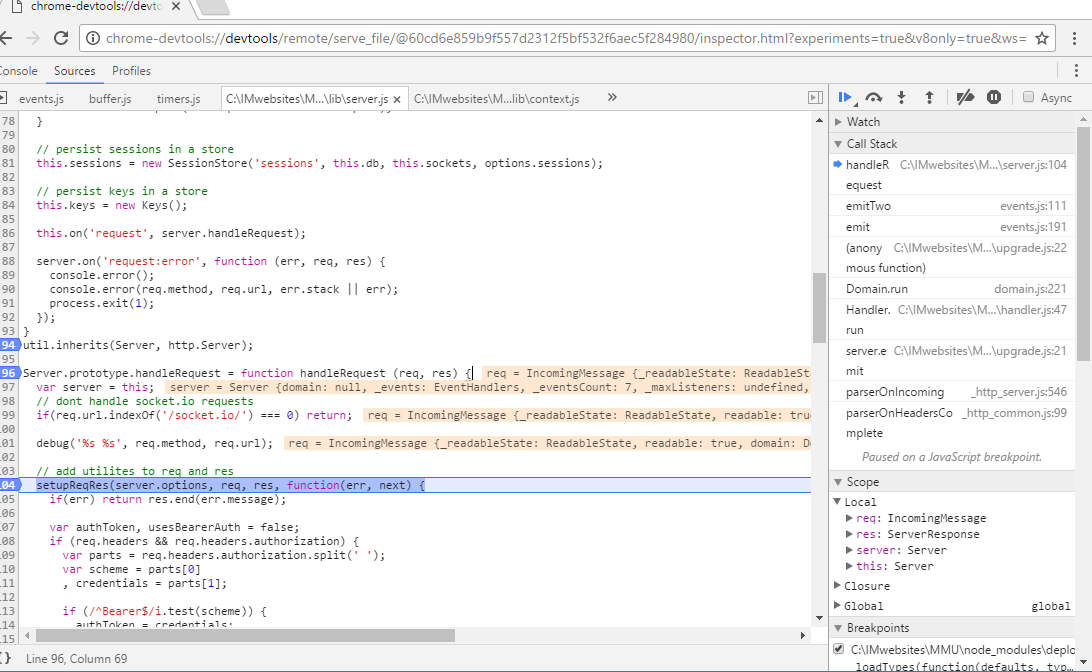
you just copy this and paste in a new tab in chrome browser , It opens up the devtool. (this is only debugging window. It doesn't start your application)
Now you open a browser window or what ever ways you want to access your application , make the first call.

You can use F8 (Run) , F10 (skip) , F11 (step into) keys on Windows to step through the code.

Note: Some times the devtool session hangs in the memory somewhere. So , restart and you will get a new link with new session id.

*** Make sure Chrome devtool -> settings    debugger   is not disabled (checked)
Debugger
Disable JavaScript
DevTools
Auto-open DevTools for popups


2. Use Devtool npm package. (That again launches Chrome Devtool Console UI)

> npm install devtool -g

Then,

> devtool server.js   - This launches the Chrome Devtool console.


3. Inbuilt in NodeJS :  'debug' argument 

node debug server.js

This is very manual - for example,
To add and stop at a break point  you have to add 'debugger' statement inside your source code! (I know you don't want to. )


4. Visual Code 

Comments

Popular posts from this blog

LLM on Mobile Phone : Mini Universal data and assistant running on an android smart phone Galaxy S23

  Imagine a world where everyone has access to a mini #OpenAI's #ChatGPT on their mobile phone, answering any question on any topic, right from their local phone memory. No need for internet. This is the future of #LLMs on mobile devices, and it's happening now. #MLC-AI has created a way to install a 3 billion parameter #RedPajam #LLMModel on a #Galaxy #S23 smartphone. This is a powerful #LLM that can generate text, translate languages, write different kinds of creative content, and answer your questions in an informative way. And it's all available on your phone, without the need for an internet connection. This could have a profound impact on people all over the world. Millions of suburban students who don't have access to the internet could now have access to a universal data source that can answer most of their questions. Refugee camps around the world could also benefit from this technology, giving refugees access to information and resources that they might not ot...

Ohmni robot disassembly - Parts and structure inside Ohmni Telepresence Robot - Tear down

    The tablet, speakers were disconnected and removed in different video.    Ohmni robot disassembly - Parts and structure inside Ohmni Telepresence - Design - Mechonical and Electrical components .

Setting up Rassberry Pi Zero W 1/2 with USB (not using hdmi) On MAC

Copy  Rassberry Pi zero image (pi 3 image also supported on pi zero) on a SD card https://www.raspberrypi.com/software/     From mac - Finder - open SD card . It opens the root folder We will edit or create 4 files:  config.txt cmdline.txt ssh wifi   config.txt At the bottom of the file add this line dtoverlay=dwc2 cmdline.txt add this line between rootwait  ........  quiet . Should look  like this, rootwait modules-load=dwc2,g_ether quiet   ssh create an emptyfile named ssh (no extensions)   wifi : (pi zero can connect only to 2.5gh Unless you update your firmware) create this file in root : wpa_supplicant.conf   add this lines to the file - with your own wifi credentials country=US ctrl_interface=DIR=/var/run/wpa_supplicant GROUP=netdev update_config=1 network={ ssid="*******" psk="********" }  Insert sd card in raspberry pi  zero w , and connect from pc with, ...